


The appeal of Apple Foundation Models is obvious. The model is built into the platform, runs on device, aligns with Apple’s privacy story, and does not introduce the per-token economics of a third-party API call. On paper, that sounds like the perfect default for an app like Caliq.
We wanted that to be true. In practice, it is not enough for the core scheduling pipeline. Caliq is not just generating nice text. It is turning messy human input into structured calendar actions, often from typed notes, shared text, links, screenshots, or calendar files. A parser that sounds plausible but drops structure is not a helper. It is a risk.
The public API is smaller than the broader Apple Intelligence story
Apple’s public Foundation Models framework gives developers direct access to an on-device model, not the broader private-cloud path Apple uses elsewhere in Apple Intelligence.12 That matters, because the on-device model is not interchangeable with the larger systems Apple can rely on inside its own first-party stack.
Apple’s own guidance also says server-based models are usually the better fit when a task needs larger or more powerful reasoning than fits comfortably on a device.3 That is a useful signal. Apple itself is not presenting the current on-device Foundation Models API as the universal answer for every reasoning-heavy workflow.
The context window is small for a real scheduling pipeline
The current Foundation Models context window is 4096 tokens.4 That can be enough for lightweight transformations, but Caliq is not simply asking for a polished sentence back. A real scheduling pass can involve imported content cleanup, reference date and timezone context, clause-level event splitting, recurrence hints, title and location extraction, structured output expectations, and post-parse validation.
That budget gets consumed quickly. And when a general model is working near a tighter planning budget, what often gets lost is exactly what we care about most: qualifiers, recurrence, relationships between events, and edge-case wording. The failure mode is not always a visible crash. More often it is an answer that looks clean while quietly dropping crucial structure.
Availability is still gated by Apple Intelligence requirements
There is also a product-availability problem. Foundation Models depends on Apple Intelligence being supported and enabled on the person’s device.15 In practice, that means device eligibility, operating-system version, available storage, language settings, regional rollout, and the model actually being ready all matter before the feature can even run.5
That is acceptable for a secondary enhancement. It is much harder to accept for a core parser. Caliq cannot make its central scheduling behavior depend entirely on a capability envelope we do not control end to end.
Safety is still too blunt for a production parser
This is the part we ran into most sharply. In our testing, the model could trigger safety behavior on safe scheduling text. Apple’s own developer forums include reports of false-positive blocks, and Apple staff have acknowledged that this area is still being improved.6 That is encouraging, but it does not change the present reality.
For a chatbot, a false refusal is annoying. For a calendar pipeline, it is a hard stop on a user task that should have succeeded. When someone is simply trying to describe a day, a meeting, or a plan, the product cannot afford to behave as though ordinary language is unsafe.
The model is general purpose, and it is still moving
Apple’s own guidance warns that generative models can hallucinate, get important details wrong, and produce different outcomes for the same input.3 Apple engineers have also said there is currently no API to choose or pin a specific Foundation Models version.7 That matters more than it sounds.
Caliq is not asking for a delightful draft. It is asking for repeatable extraction of time-bearing meaning: dates, time ranges, recurrence patterns, sequencing, context carryover, and conflict implications. When behavior can shift with an OS update and the app cannot pin the model version, regression risk rises immediately.
Caliq’s problem is not generic text generation
Scheduling looks simple until the note becomes real. One sentence can imply multiple events. Relative dates depend on locale and reference time. Titles, locations, and descriptions often live in the same clause. Repeat rules, all-day logic, and conflict checks all need to be correct enough to touch a real calendar.
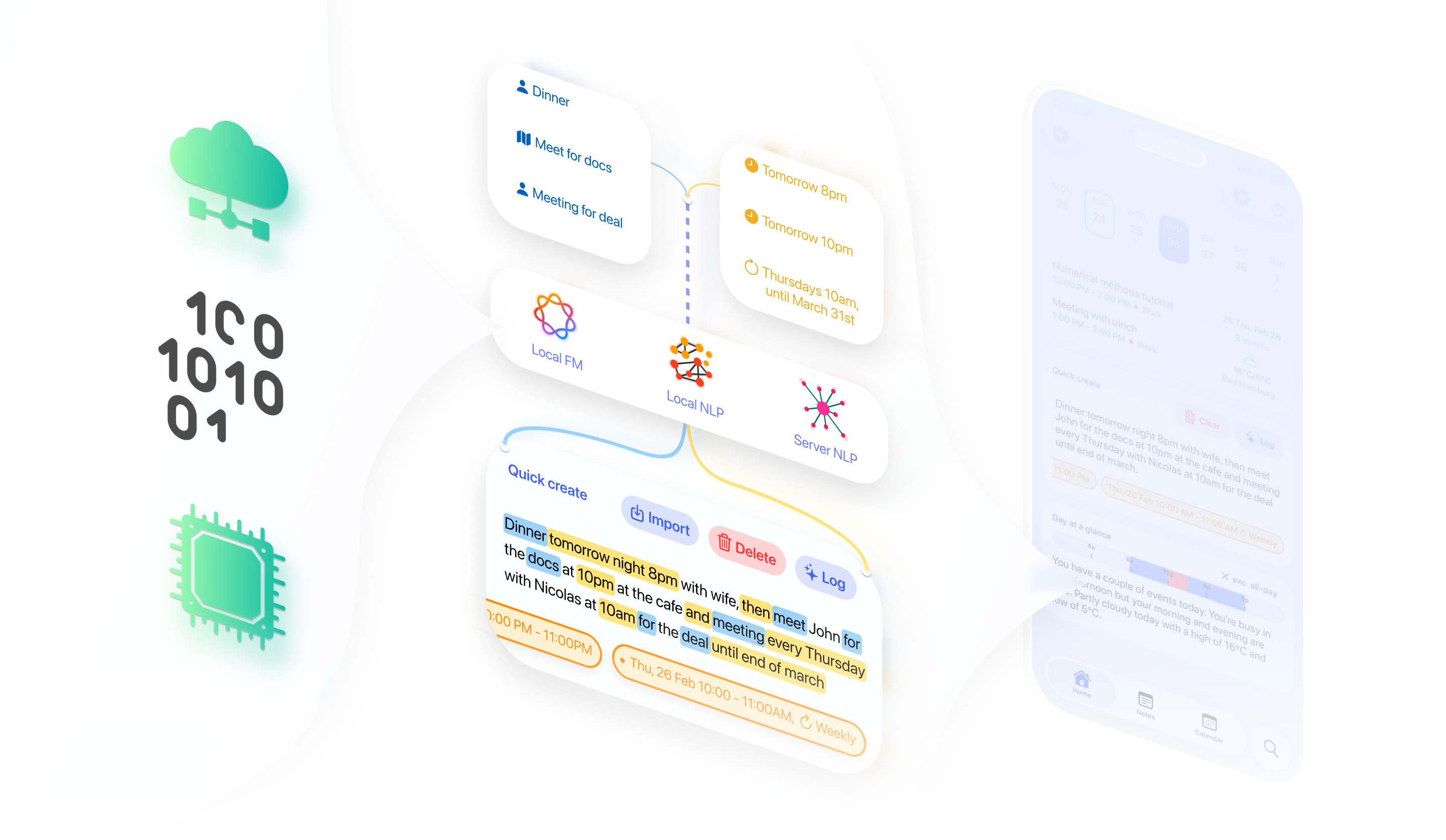
The app reflects that. Before any event is created, Caliq first normalizes imported material from sources like images, Google Calendar links, and ICS files into a cleaner scheduling prompt. Its local parser then repairs common temporal typos, detects multi-day spans, anchors loose time mentions to nearby date anchors, infers sensible bounds for phrases like morning or dinner, extracts clause-level titles and locations, and identifies repeat hints. After that, the app still has to branch between single-event and multi-event flows, preserve manual chip edits, and check for conflicts before writing to EventKit.
Why Caliq uses three tiers of intelligence
That is the reason for the stack. Caliq does not rely on one generic model to do everything. Just as importantly, the three tiers sit inside a larger deterministic calendar engine that keeps every output accountable.
- Tier 1: custom local scheduling intelligence. This is the fast on-device layer that handles most of the structural work: temporal cleanup, date-span detection, time anchoring, clause splitting, title and location extraction, repeat hints, and basic intent classification for one event versus several. It is designed specifically for scheduling language, not general-purpose prose.
- Tier 2: selective Apple on-device intelligence. We do use Apple’s on-device model, but in roles where failure is survivable and quality can be optional: lighter assistive phrasing and summary-style language tasks. In the current app, that is closer to supportive Day Glance-style language than authoritative note-to-calendar conversion.
- Tier 3: richer server-side intelligence. This is reserved for the harder parses. When a note genuinely looks scheduling-related and the user has online processing enabled, Caliq can ask a stronger server parser for structured events, then merge those results back into the same editing state instead of blindly overwriting local understanding.
Around those tiers sits explicit scheduling logic: calendar selection, recurrence construction, conflict scanning across repeating horizons, preservation of user edits, and final EventKit writes. The point is not to reject Apple’s model. The point is to place each kind of intelligence where it is actually strong and keep deterministic guardrails around the parts that can affect a real calendar.
Where Apple Foundation Models may still fit
None of this means Apple Foundation Models are useless. They may become stronger over time, and even now they can be a good fit for lighter assistive tasks, polishing, and selective transformations. In Caliq today, that is where they make the most sense: supportive language work with clean fallback behavior when the model is unavailable or not good enough.
But as of March 11, 2026, they are still not the right sole engine for Caliq’s core parsing workflow. We need a stack that can normalize messy imports, preserve multi-event structure, survive ambiguity, respect manual edits, stay available across different device conditions, and fall back gracefully when network or model constraints get in the way. That is why Caliq still needs its custom NLPs. The three-tier architecture is not extra decoration. It is the reason the product can treat messy human scheduling language with more precision than guesswork.
Sources
- What’s new in Apple Intelligence, Apple Developer.
- PCC and Foundation Models, Apple Developer Forums.
- Generative AI, Apple Human Interface Guidelines.
- FoundationModel, context length, and token length mismatch?, Apple Developer Forums.
- Get Apple Intelligence on iPhone, Apple Support.
- Foundation Models "Detected content likely to be unsafe" error, Apple Developer Forums.
- Using past versions of Foundation Models as they progress, Apple Developer Forums.